A Programming Guide for the New Era - 2026
From Assisted Coding to Vibe Coding
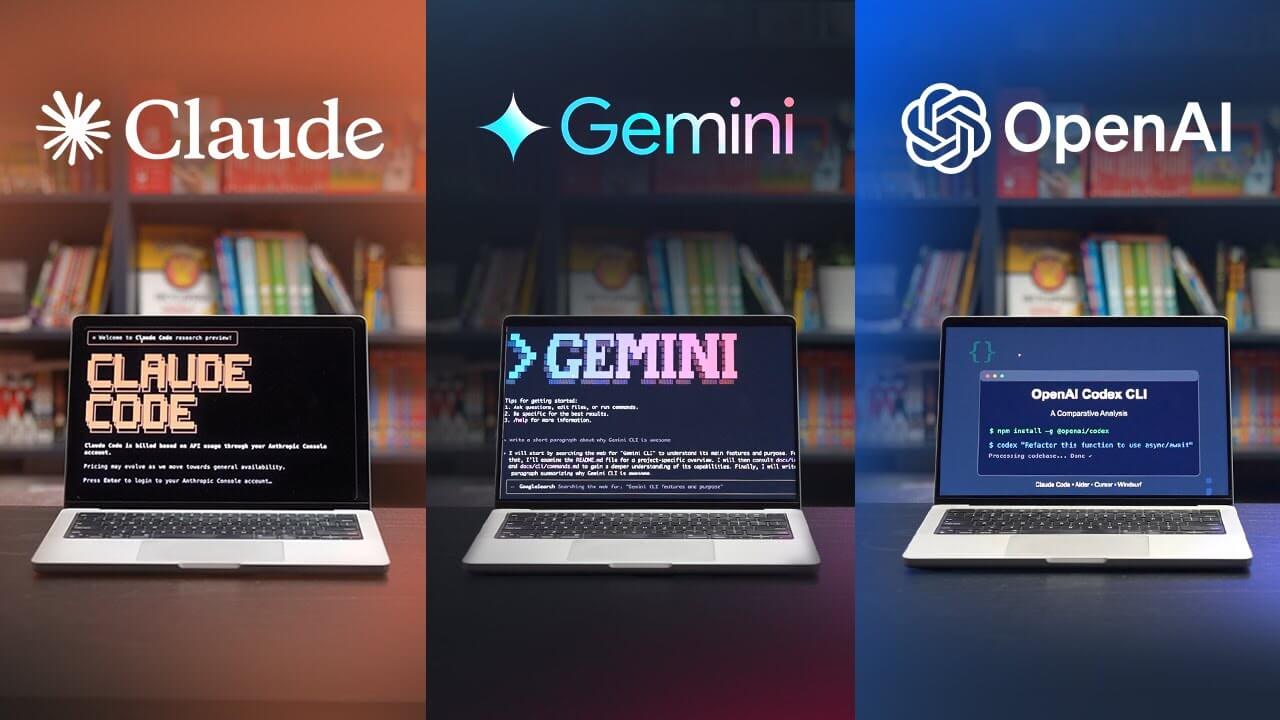
This article originally began as the draft script for an internal talk at my company, but I decided to turn the reusable parts into a public blog post. So I will deliberately avoid any internal repositories, processes, or case studies, and keep only the methods, work habits, and mindset shifts that are useful to most developers.
The main audience for this article is people who are still using IDE-based AI assistance and web chat products from large models, but have not really used command-line tools such as Claude Code or Codex CLI yet. Through this article, what I want to convey is why CLI tools are the future, along with a rough beginner-oriented introduction to how they are used.
If I had to summarize the core point of this article in one sentence, it would be this: large-model-assisted programming is only the starting point, while Vibe Coding is a new way of working. It is not just “an IDE with an extra chat box,” nor is it simply “asking AI to autocomplete code.” It is closer to gradually reconstructing the act of “writing code” into the process of “describing goals, constraining execution, reviewing results, and iterating on the system”. And for the latter, all you really need is to interact with an Agent in natural language.
I did not understand it this way from the beginning. On the contrary, I started from the most ordinary stage of “using the ChatGPT web app to help me edit a few snippets of code,” and only reached where I am today step by step.

Preface: My Personal Journey from Assisted Coding to Vibe Coding 
If I look back at my own path over the past few years, it can roughly be divided into several stages.
At the very beginning, when ChatGPT appeared in 2022, I subscribed to the GPT-3.5 web service and treated it as a programming Q&A tool that felt more human than a search engine. Its typical use cases at the time were simple: asking how to pass parameters to Linux tools, explaining error messages, generating short boilerplate snippets, helping me refactor a function, or reorganizing a piece of messy logic. Models at that stage were nowhere near as capable as they are today, but for the first time they made me realize that a lot of the “mechanical thinking” in programming could be outsourced.
Later on, I started paying for Cursor. This was a crucial stage, because it was the first time I experienced that AI was no longer just answering questions, but beginning to understand the context of an entire project. I gradually stopped asking only “how should I write this code,” and started asking things like “please implement this feature based on the current project’s style.” At this point, AI had already shifted from being a search substitute to becoming a junior collaborator that was still not fully reliable, but already usable in cooperation.

After that, I also tried GitHub Copilot in VSCode. Copilot did not influence me because it wrote the best code, but because it normalized the idea of “accepting AI as part of the coding process.” Autocomplete, local generation, and predictive suggestions while typing gradually got me used to working together with a model. At that stage, it felt more like an assistant that never got tired of helping.
Later, I started using Claude Code, and that was almost the most cognitively disruptive stage in my entire AI-programming journey. Before that, whether it was web-based LLMs, Cursor, or Copilot, I could clearly feel that they improved efficiency, but they still felt more like “partners for assisted programming.” Claude Code, however, made me realize that AI was no longer just helping me complete a few lines of code or answer a few questions. It was already capable of independently completing concrete tasks. Because my budget was limited, and because Claude maintained fairly strict access restrictions in mainland China, for quite a long time I mainly connected Claude Code to Zhipu GLM-4.7 for my daily work. The biggest shock in that phase was not how strong the model itself was, but that the CLI Agent interaction model itself had already changed the way work happened. You were no longer in an IDE saying, “please help me modify this small piece of code.” Instead, you were handing a real repository, real constraints, real commands, and real risks to an Agent in the terminal and letting it investigate and handle them.
During that period, after Gemini 3.1 Pro was released, I also used it together with Gemini CLI for a few months, and its quality again left me genuinely impressed.
However, once I started using Codex with GPT-5.4 in March 2026, I experienced another cognitive shock. In some sense, this impact was even more direct than the first time I used Claude Code, because Codex made me feel concretely, for the first time, that a sufficiently capable Agent could genuinely take over a lot of my work completely. Some code that I used to feel I had to at least review can now be left entirely unread. (Later I realized that part of the reason was that Codex’s safety review mechanism is looser than Claude Code’s, so it handles many things without asking for confirmation.)

For about a week during that period, I even went through a brief stretch of anxiety and fear. The feeling was extremely direct: AI is simply too smart, and it may very well replace me. It is smart enough that you begin to re-examine many default assumptions, such as “what part of a programmer’s work is truly irreplaceable,” “whether the core labor of software engineering as a whole will migrate elsewhere in the future,” and “whether the human role in the workflow will increasingly become someone who mainly authorizes, accepts results, and presses Enter.”
That emotion and those thoughts directly gave rise to another article of mine: The Future of Human Work Might Just Be Pressing Enter for AI. I did not write that article to create anxiety. I wrote it because after truly using Codex as a productivity tool, I seriously felt that this might indeed be one possible future for humanity.
So if you ask me why I talk seriously about Vibe Coding instead of treating it as a short-lived buzzword, my answer is simple: because I have actually walked through this path, and I have genuinely felt the paradigm shift.
1. Using Large Models Does Not Automatically Mean Vibe Coding 
Here we probably need to distinguish one thing first: using large models to assist programming does not equal Vibe Coding.
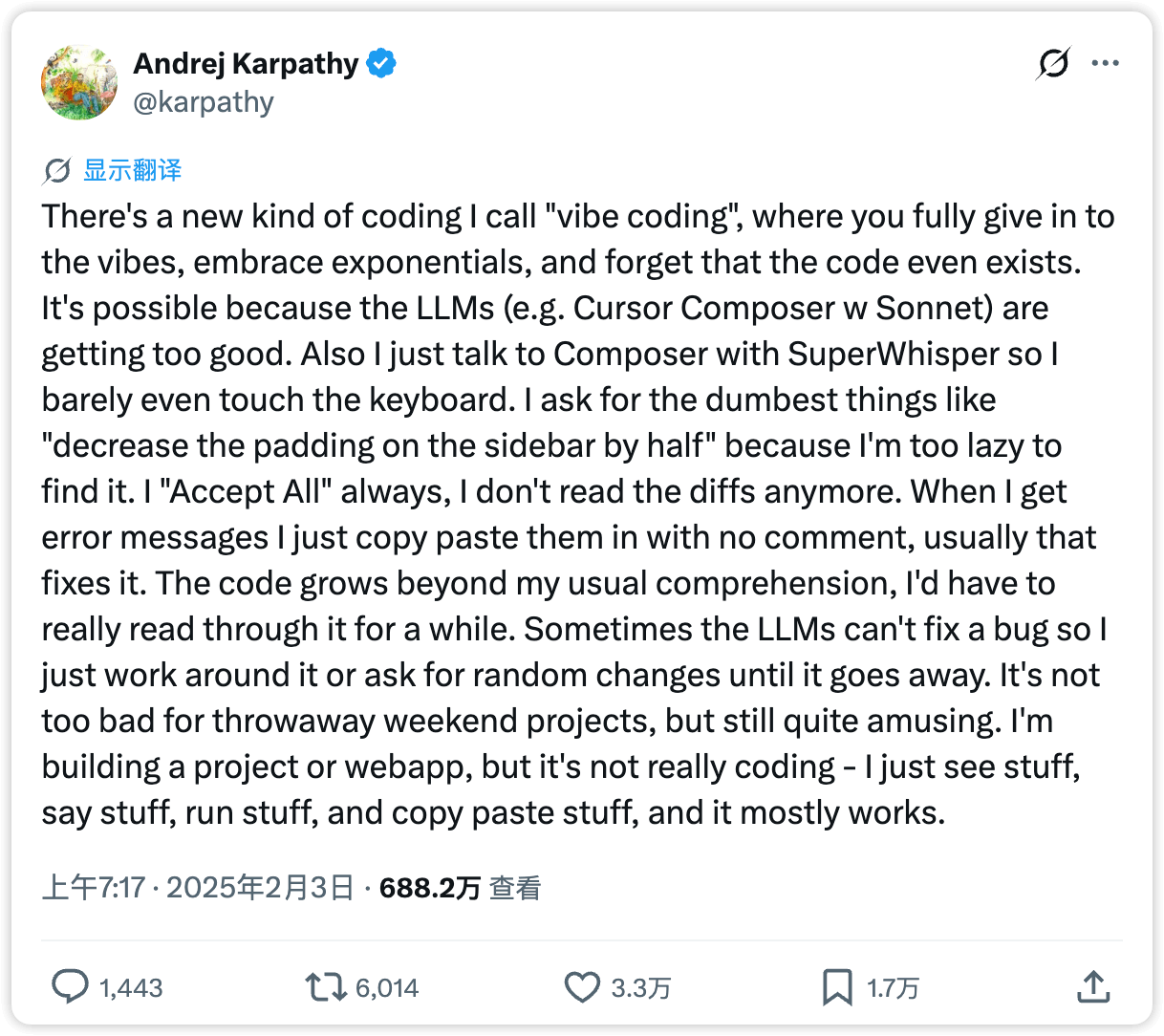
The term “Vibe Coding” comes from a tweet by Andrej Karpathy on X. At the time, it captured quite precisely a change in experience that many people had already begun to feel while using AI coding tools, but had not yet clearly articulated.
Today, many people are already using tools such as ChatGPT (web), Cursor, Trae, and DeepSeek to help write code. But most of the time, they are still doing assisted programming: AI helps with autocompletion, explanation, generation, and bug fixing, while the main workflow is still pushed forward manually by a human inside the IDE. Of course, this can still bring enormous gains in efficiency, but in essence, you are still the one writing the code, and AI is just a smarter tool.
Vibe Coding adds one crucial change on top of that: you begin to delegate the entire “how to do it” part to the Agent, while you yourself focus mainly on “what should be done, how far it should go, what the boundary conditions are, and when it should stop.”
More precisely, you only write prompts. You do not type a single line of code, not even a simple command like git push.
At that point, the relationship between you and the tool is no longer a simple Q&A relationship, but something much closer to task delegation.


Many IDE users may ask why they should use a CLI. They may still be understanding the issue as a “VSCode vs Vim” choice. But in the age of AI, IDE and CLI already represent two completely different collaboration philosophies:
- In an IDE workflow, AI is more like a super colleague or consultant, waiting for you to call on it whenever needed.
- In a CLI workflow, AI is more like a super employee, while you are its direct manager. You need to learn how to constrain it, authorize it, and audit it.
These are not things on the same dimension. But from my personal perspective, the latter stands above the former, because of one brutal reality:
AI is now both fast and good at writing code and debugging. Humans should learn to let go.
However, the “vibe” here does not mean not reviewing, not thinking, or casually letting the model write random things. It means entering a different rhythm:
- Humans are more responsible for: defining goals, breaking down tasks, setting constraints, and inspecting outputs
- Agents are responsible for: research, concrete implementation, file discovery, command execution, and test verification
This rhythm is no longer “AI helps me write code,” but “I am directing a very capable employee to do the work.” So you do not “completely stop needing to understand code,” nor does “being able to speak plain language” become enough to do complex engineering. If you want reliable engineering outcomes, you still need judgment: to know whether the goal has been understood correctly, where the risks are, when to make the Agent stop, and which changes must be reviewed manually.
In other words, Vibe Coding is not abandoning engineering discipline. It is moving engineering discipline away from “manually writing the implementation” and toward “designing the task system and the review mechanism.”

2. Some Conventions in AI Coding CLI Tools 
As AI coding CLI tools have gradually evolved, the industry has also gradually formed a number of default conventions and norms. This chapter introduces some of them.
First, an AI coding CLI is not a chat tool. You can think of it as an engineering agent that can read repositories, execute commands, and edit files. Because of that, the repository needs to contain certain conventional files to guide the model’s work.
2.1 Documentation Written for Agents 
When browsing some of the newest AI-authored repositories, you will often find a file such as AGENTS.md, CLAUDE.md, or GEMINI.md in the root of the repository.
Its working principle is actually very simple:
-
When an AI coding CLI tool starts, it loads this Markdown file into context by default.
AGENTS.md (https://agents.md/) is an open standard that defines a specification for a repository-level instruction document. It is currently adopted by Codex and Gemini. Its definition is:
Think of AGENTS.md as a README for agents: a dedicated, predictable place to provide the context and instructions to help AI coding agents work on your project.
In other words:
README.mdis written for humans, and mainly contains quick-start instructions, project introductions, and contribution guides;AGENTS.mdis written for Agents, and can contain things like build steps, test methods, code conventions, and other details that would make the README bloated but are important for an Agent.
The two complement each other rather than replacing each other.
For today’s common CLI tools, the conventional entry files are roughly as follows:
- Claude Code: uses
CLAUDE.md - Codex CLI: uses
AGENTS.md - Gemini CLI: uses
GEMINI.md, or allows you to change it in configuration
Because different developers may use different tools, a common practice in real projects is to maintain one primary instruction document and then create symlinks so that different tool-specific filenames all point to that same document. For example:
./AGENTS.md
./CLAUDE.md@ -> AGENTS.md
./GEMINI.md@ -> AGENTS.md
Here is an example from an open-source repository: Gohugo, the framework used by this blog. It has existed for 13 years, and recently it also introduced documentation written for Agents:
- AGENTS.md: https://github.com/gohugoio/hugo/blob/master/AGENTS.md
- CLAUDE.md: https://github.com/gohugoio/hugo/blob/master/CLAUDE.md
2.2 Skills: Lazy-Loaded Manuals for Agents 
For an Agent, if you put everything it needs to know into AGENTS.md, the context will easily become bloated.
Some information does not need to be known while the Agent is doing unrelated work. It only needs to read the corresponding document when it encounters the relevant problem.
Out of that problem and assumption, SKILL.md was born.
SKILL.md (https://agentskills.io/what-are-skills) is also an open standard that defines a set of conventions for Skills. At present, all AI coding CLI tools use this same format standard.
Its definition is:
Agent Skills are folders of instructions, scripts, and resources that agents can discover and use to do things more accurately and efficiently.
And the core of how it works is this sentence:
Skills use progressive disclosure to manage context efficiently
Progressive disclosure allows the long contents in SKILL.md to be loaded on demand, avoiding the problem of filling the context window all at once.
Here is a concrete example of a SKILL.md file (click Code to expand):
---
name: summarize-experiment
description: Summarize the results of an algorithm experiment. Use this when asked to analyze experiment outputs, compare different configurations, summarize metric changes, or write an experiment retrospective.
---

When the user asks to summarize experiment results, follow these steps:

1. Read the repository instruction files first, and confirm the experiment directories, log format, metric names, and result locations in this project.
2. Find recent experiment output files, for example:
    ```bash
    find . -type f \( -name "*.log" -o -name "*.json" -o -name "*.yaml" -o -name "*.csv" \) | tail -n 50
    ```
3. Search for common metric fields, for example:
    ```bash
    rg -n "accuracy|acc|auc|f1|precision|recall|loss|ndcg|mrr|bleu|rouge" .
    ```
4. If there are multiple experiments, prioritize extracting:
    - differences in experiment configuration
    - differences in datasets
    - differences in random seeds
    - changes in core metrics
5. When presenting the result, summarize it in the following format:
    - the objective of this experiment
    - the main configuration
    - the core metrics
    - changes compared with the baseline
    - possible reasons
    - next-step suggestions
6. If the metrics fluctuate abnormally, you must check and remind the user:
    - whether the dataset or data split changed
    - whether the random seed changed
    - whether the evaluation script changed
    - whether training failed to converge or the log is incomplete
(Example: a real Skill for summarizing algorithm experiments)
This Skill defines how an Agent should behave when it is asked to summarize experimental results.
And the way it works is also quite simple:
-
When an AI coding CLI tool starts, only the 'name' and 'description' parts wrapped in '---' from each SKILL.md file are loaded into context by default. The main body outside that range is loaded only when the Skill is actually used.
That is to say, only the following part:
---
name: summarize-experiment
description: Summarize the results of an algorithm experiment. Use this when asked to analyze experiment outputs, compare different configurations, summarize metric changes, or write an experiment retrospective.
---
is loaded when the CLI starts, while however long the main body below may be, it will be loaded using “progressive disclosure” only when the Skill is actually invoked.
In this way, an AI coding CLI can know what Skills it has available at startup, and then load the corresponding Skill when the matching trigger conditions are met.
2.3 Discovery Hierarchy for Instruction Files and SKILLS.md 
The two conventions above are the two most important concepts in AI coding CLI context management.
However, CLAUDE.md / AGENTS.md are not limited to the root of a project.
- They can also exist in your home directory, becoming broader user-level context.
- They can also exist in subdirectories of a project, becoming more local context closer to the current working directory.
Taking Codex as an example, its official hierarchy is defined as:
- AGENTS.md
- Responsible for repository rules, work conventions, and long-term constraints
- The official documentation explicitly supports three levels:
global level:~/.codex/AGENTS.mdproject level: AGENTS.md in the repository rootsubdirectory level: AGENTS.md encountered along the path from the project root to the current working directory
- The closer it is to the current working directory, the higher the priority
- Reference: https://developers.openai.com/codex/guides/agents-md#how-codex-discovers-guidance
- Reference: https://developers.openai.com/codex/skills#where-to-save-skills
The more general a Markdown file is, the higher its level. The more specific it is, the lower its level.
Written this way, instruction files do not become bloated, and Skills also become easier to reuse.
3. Getting Started with AI Coding CLI Tools 
Starting these tools is simple: just run the corresponding command inside a repository:
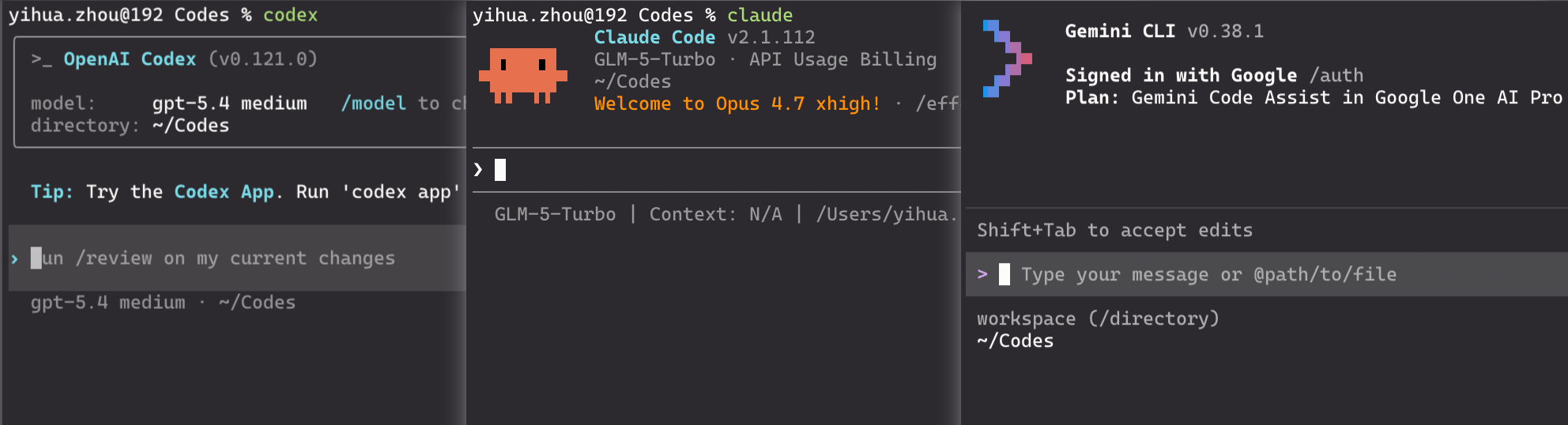
3.1 Normal Mode / Plan Mode / High-Authorization Mode 
You can switch modes with Shift + Tab. Claude Code has three modes:
- Normal mode: the default working mode. Claude can directly read, analyze, and modify project contents, but it still asks for confirmation before important operations.
- Plan mode: only researches, analyzes, and proposes an execution plan, but does not directly modify files. It is suitable when you want to review the approach and assess the impact before deciding whether to proceed.
- Always accept edits on: Claude can execute edits directly without requesting confirmation one by one. It is suitable when your goal is already clear and you want it to complete a sequence of changes continuously.
(In Codex, Shift + Tab only switches between the first two modes. The high-authorization mode must be explicitly enabled through the /permissions command.)
3.2 Common Slash Commands 
In the interactive interface, special commands beginning with / provide specific functions. The exact commands differ across tools, but the commonly shared and useful ones are roughly these:
/init: initialize the project, analogous togit init. Here,/initmeans initializing an AGENTS.md document./model: switch the model/skills: view and manage currently loaded skills/status: inspect the current session state, permissions, context usage, token usage, and so on/compact: compress the context of a long session (use this when the context window is about to fill up)/clear: clear the context history (use this when you need to change topics)
For Claude Code specifically, it also has several unique Slash commands that Codex does not:
/rewind: roll the context back to an earlier node. This is very useful when you made an incorrect input and want to undo it, or when you want to go back and try a different branch of the conversation./btw: “by the way mode.” This allows you to insert a small question temporarily without interrupting the main task or polluting the main context. It is suitable when you want to confirm one small thing while it is working, such as “what does this config option mean” or “how should this command be written,” and then close that side thread immediately./plugin: Claude Code’s unique plugin marketplace, a bit like an app store, where you can directly search for and browse plugins, Skills, and MCPs for installation.
(Codex has never followed up with these few features. Personally, I suspect this reflects a difference in design philosophy: Codex seems to aim for a more minimal tool that relies on direct natural-language interaction with the model, without requiring rewind or plugins to achieve equivalent results.)
3.3 Explicit and Implicit Skill Invocation 
If you want to invoke a Skill explicitly, you can use $<SkillName> (Codex) or /<SkillName> (Claude Code). For example:
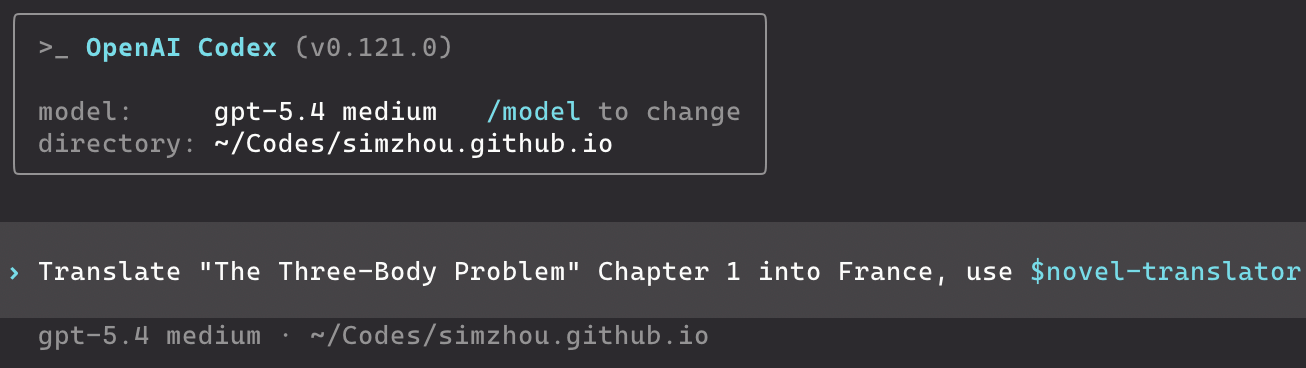
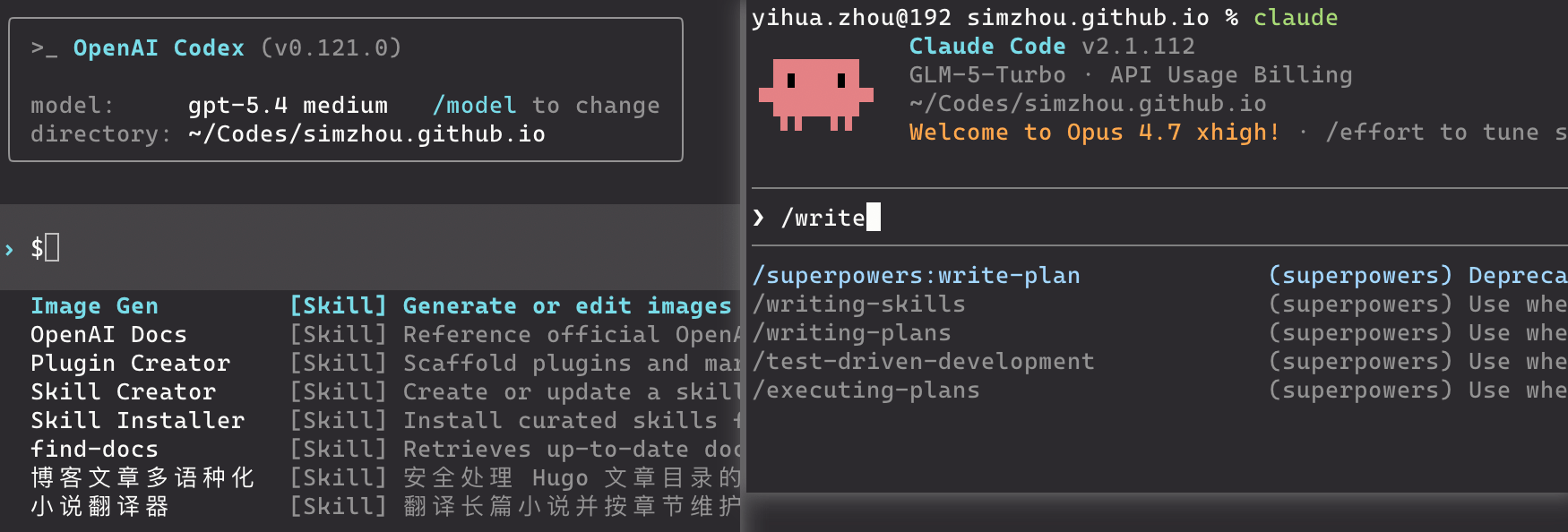
In addition, even if you do not explicitly specify which Skill should be used, AI coding CLI tools can still call Skills automatically during work, based on the “triggering cues” described by the "description" field in SKILL.md.
4. Some Advanced or Frontier Features of AI Coding CLI Tools 
As of today (April 18, 2026), most people really only need to master the content above, then build a solid AGENTS.md / CLAUDE.md / GEMINI.md and Skills repository, connect it to a sufficiently capable model endpoint, and they will already be able to get Agents to complete some fairly difficult tasks.
However, humans are never satisfied with what is right in front of them. We always want to push models as far as possible and extract the maximum of their capabilities. So in this chapter, I will selectively talk about some of the so-called advanced or frontier features that I think are worth mentioning, features that the Harness Engineering community is currently exploring in order to empower CLI tools further.
4.1 Subagents 
When an Agent is executing a specific task, it can be allowed to call some subagents to handle certain subtasks. These subagents have:
- independent context (they do not inherit the main Agent’s context)
- customized system prompts (for their own scope of work)
- specific tool access permissions and independent authorization
That may still sound abstract, so let’s look directly at an official example from Claude Code:
---
name: data-scientist
description: Data analysis expert, skilled in SQL queries, BigQuery operations, and deriving insights from data. Should be used proactively for data analysis tasks and queries.
tools: Bash, Read, Write
model: sonnet
---

You are a data scientist specializing in SQL and BigQuery analysis.

When called:
1. Understand the analysis request
2. Write efficient SQL queries
3. Use the BigQuery CLI tool (`bq`) when appropriate
4. Analyze and summarize the results
5. Present findings clearly

Key practices:
- Write optimized SQL queries with appropriate filtering
- Use suitable aggregations and joins
- Add explanatory comments for complex logic
- Format results for readability
- Provide data-grounded recommendations

For every analysis:
- Explain the query approach
- State all assumptions
- Highlight the key findings
- Offer data-based follow-up suggestions

Always make sure the queries are efficient and cost-effective.
(An official Claude Code example of a subagent: a data scientist)
As you can see, the format of a Subagent is very similar to that of a Skill.
Because of that, the invocation style of a Subagent is also very similar to a Skill, including both explicit and implicit invocation.
The official Claude Code documentation on Subagents explicitly states:
- Claude automatically delegates tasks based on the task description in your request, the description field in the subagent configuration, and the current context.
- When automatic delegation is not enough, you can explicitly request a subagent yourself.
In addition, subagents can also run in the background, which makes task parallelization possible. That is something Skills do not provide.
4.2 Ralph Loop 
Ralph Loop is a third-party repository from: https://github.com/snarktank/ralph
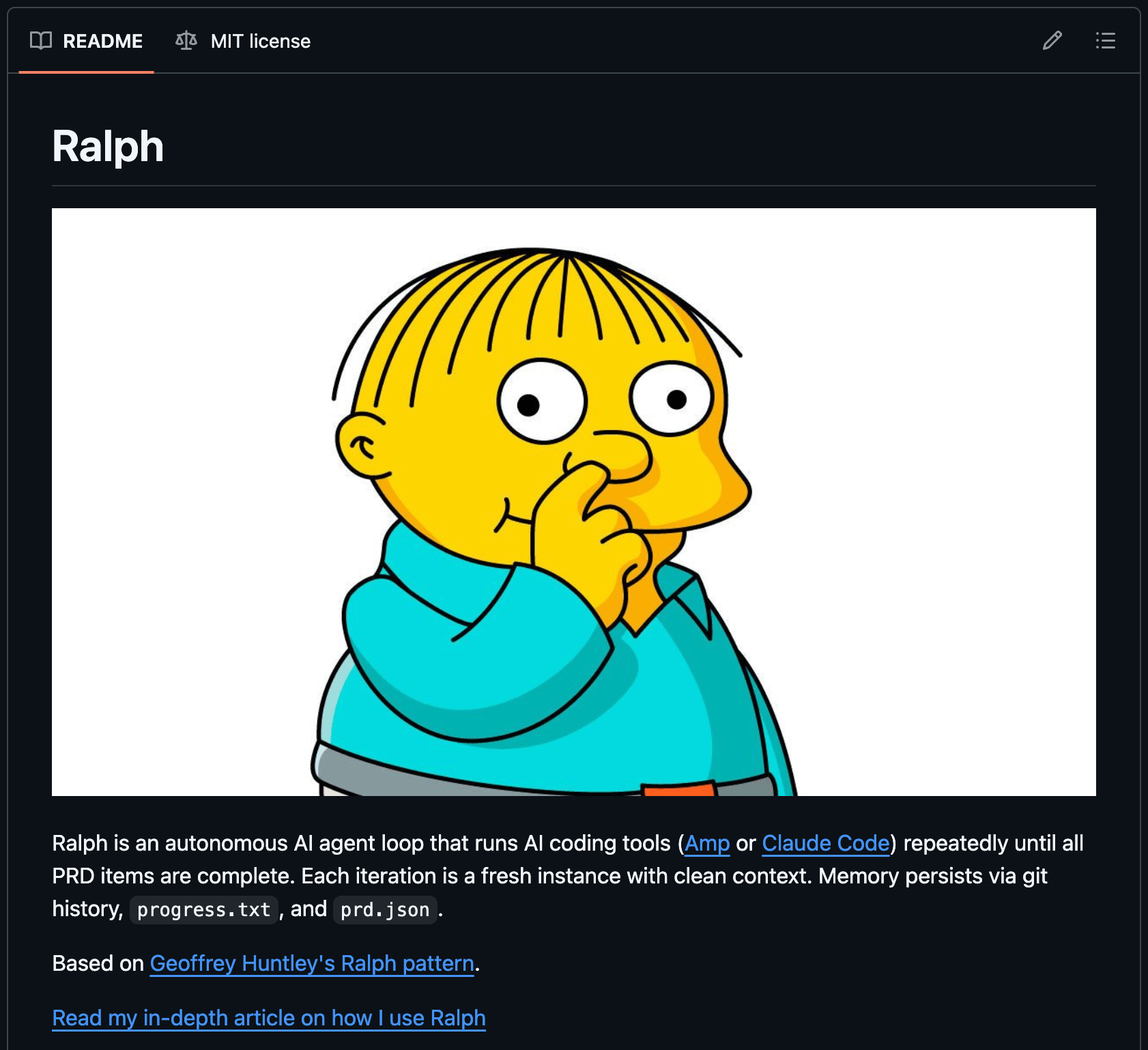
The core idea of Ralph Loop is to let an Agent keep running automatically against a task list until everything is finished.
Here, “automatically” means the Agent has full permissions and does not require human confirmation. The human can literally go to sleep.
You can see how it works in the source code:
for i in $(seq 1 $MAX_ITERATIONS); do
  echo ""
  echo "==============================================================="
  echo "  Ralph Iteration $i of $MAX_ITERATIONS ($TOOL)"
  echo "==============================================================="

  # Run the selected tool with the ralph prompt
  if [[ "$TOOL" == "amp" ]]; then
    OUTPUT=$(cat "$SCRIPT_DIR/prompt.md" | amp --dangerously-allow-all 2>&1 | tee /dev/stderr) || true
  else
    # Claude Code: use --dangerously-skip-permissions for autonomous operation, --print for output
    OUTPUT=$(claude --dangerously-skip-permissions --print < "$SCRIPT_DIR/CLAUDE.md" 2>&1 | tee /dev/stderr) || true
  fi

  # Check for completion signal
  if echo "$OUTPUT" | grep -q "<promise>COMPLETE</promise>"; then
    echo ""
    echo "Ralph completed all tasks!"
    echo "Completed at iteration $i of $MAX_ITERATIONS"
    exit 0
  fi

  echo "Iteration $i complete. Continuing..."
  sleep 2
done
(The core logic of Ralph Loop)
The most important line here is:
claude --dangerously-skip-permissions --print--dangerously-skip-permissions: allows Claude Code to run with full permissions and without human confirmation--print: runs Claude Code in non-interactive mode (see the official docs: Running Claude Code programmatically)
When Ralph Loop runs Claude in a for loop, each round writes a Progress Report recording the current progress and passes it into the next iteration. See:
And then, through constant iteration, it gradually advances the work until the task is complete.
In my view, beyond the GitHub-repository use case shown in the project itself (product feature development), Ralph Loop is also especially suitable for two scenarios:
- analyzing and locating an extremely subtle system bug
- improving the performance of an algorithmic model
4.3 Agent Teams 
Agent Teams is an experimental feature in Claude Code. In the official documentation, there is a figure that explains how it differs from Subagents:
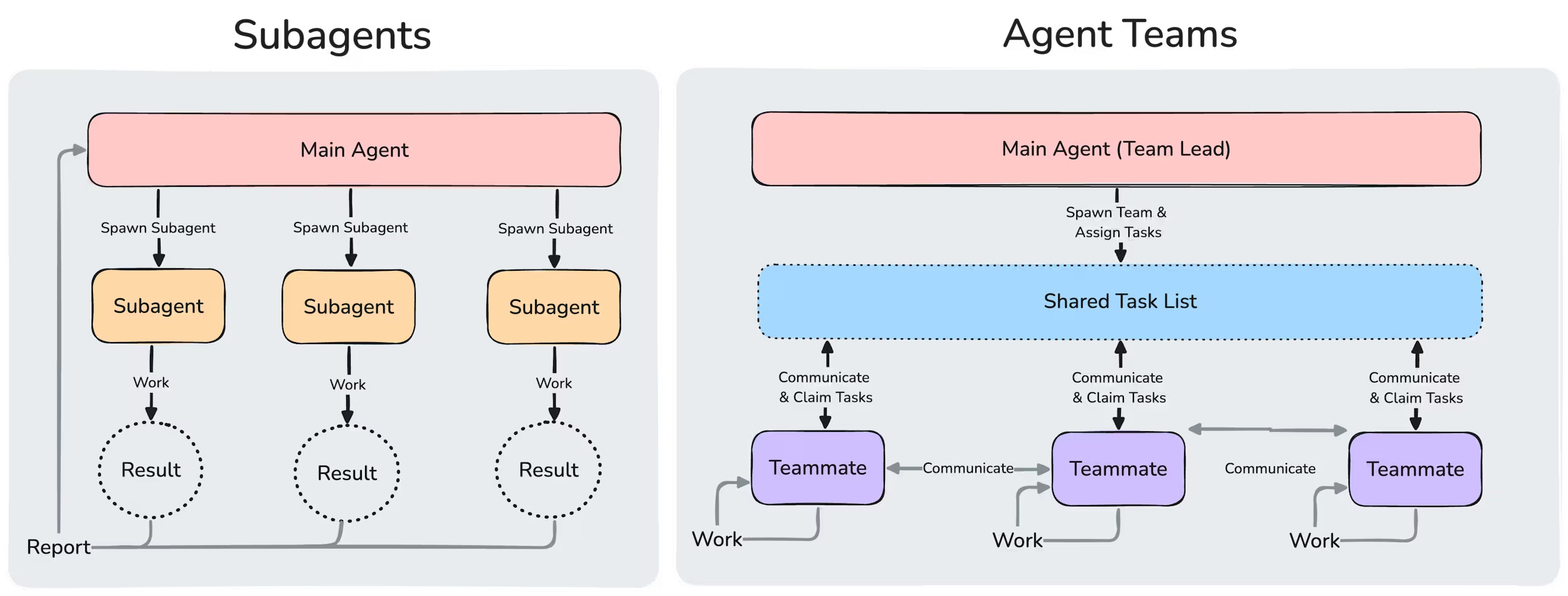
However, because this feature spins up multiple “teammates,” and those teammates can also communicate with one another, it burns an enormous amount of tokens. And so far I still have not really seen a production scenario where Agent Teams is genuinely used very effectively, so it is hard to say whether this is an impractical feature Anthropic invented partly to sell more tokens. Of course, we can also simply treat it as an experimental capability and wait to see whether someone in the industry eventually builds something truly valuable with it.
5. Some Personal Experience and Understanding 
5.1 One Principle: Do Not Chat Casually Inside the Main Repository 
Use the main repository only for things directly related to the current project.
If you want to discuss open-ended or unrelated topics, for example:
- learning paths
- side-project brainstorming
- architectural direction comparisons
- other off-topic Q&A or chatting
A better approach is:
- create a separate temporary directory, start a new Codex or Claude session there, and interact in that new session
- before switching topics in that new session, run
/clear
The reason is simple: the existing context will interfere with the Agent's judgment on your new question, and your new question will also pollute the context of the original project thread.
5.2 The Difference Between Subagents and Skills 
Subagents and Skills have very similar Markdown formats, but they are fundamentally different. According to the official documentation, the difference is:
- The essence of a Skill is a
SKILL.md. In the documentation’s own words, “Skills extend what Claude can do.” Claude “adds them to its toolkit,” loading them when relevant or when called via/skill-name. In essence, a Skill is a set of instructions, knowledge, workflow, or task scripts. - The essence of a Subagent is a “specialized AI assistant.” Each one “runs in its own context window,” with its own system prompt, tool permissions, and independent permissions. The main Claude delegates matching tasks to it, it works independently, and then returns the result.
In other words:
- A Skill solves “when this kind of task appears, what rules or script should be followed.”
- A Subagent solves “who should do this task, and under what isolated context and permissions.”
There is also one point that is easy to confuse but clearly stated in the docs: a Skill can also configure context: fork, in which case it runs inside a subagent-isolated environment; but that does not change its essence. The docs state that the “skill content becomes the prompt that drives the subagent.” In other words, even when it runs inside a subagent, a Skill is still the “task description / prompt,” not the “executor” itself; the executor is still the subagent type.
5.3 Differences Between Tools 
Since early 2025, OpenAI has gradually deprecated the widely used /chat/completions API in favor of the /responses API. As a result, the underlying inference interfaces for large-model applications are no longer compatible, and it has become difficult to compare tools fairly by connecting different tools to the same model.
On this point, I have already opened a feature request with Zhipu’s official team (https://github.com/zai-org/GLM-5/issues/39), hoping they will support OpenAI’s /responses API so that Codex can be used with it. If that happens, it will become easier to compare Claude Code and Codex while connecting them to the exact same model.
But overall:
- If you only look at ecosystem maturity, Claude Code is still stronger at the moment, especially in terms of
/marketplaceand community activity. - If you only look at execution experience, Codex is very strong. Its Agent Loop runs fast, its exploration ability is good, and it is especially suitable for handling repositories where the conventions, constraints, and commands have already been well defined.
However, because the binding between tools and models is still quite deep, it is hard to evaluate the tools themselves in isolation from the models.
As for differences among models such as GPT-5.4, Opus4.6, GLM-5.1, MINIMAX-M2.7, and so on, I will not evaluate them here. People can experience those differences firsthand while using them, or discuss them with others online or around them. Most people will probably form some opinions of their own.
6. Conclusion 
Through the discussion above, I hope more people can feel the huge productivity gain brought by AI coding CLI tools, experience the charm of the new Vibe Coding way of working, and perhaps also experience a bit of the anxiety that their jobs might one day be replaced by AI.
For people who have already started using or are deeply using CLI tools such as Claude Code, Codex CLI, or Gemini CLI, the material above is probably relatively basic and incomplete. But for most beginners, I believe it is already more than enough.
As your learning deepens, I also recommend reading more official documentation, more online materials, and more forum discussions, so that you can further strengthen your ability to work with AI effectively.
Finally, enjoy burning tokens!
7. Recommended Reading 
7.1 (Recommended) Claude Code Best Practices: 
Claude Code’s official best-practices guide, released earlier, includes usage patterns that Anthropic’s internal teams have found effective across many different codebases, languages, and environments. Most of it also applies to Codex.
7.2 A Source-Level Walkthrough of Claude Code 
A reader-created interpretation site, built with the help of large models, based on the Claude Code source code that was previously exposed by mistake:
If you are interested in Harness Engineering, Agent runtime mechanisms, context organization, or how tools like this are assembled underneath, this site is a good place for further reading.
Reference Links 
- Andrej Karpathy’s X post on Vibe Coding: https://x.com/karpathy/status/1886192184808149383
- Claude Code
- Official docs: https://code.claude.com/docs/en/quickstart
- CLAUDE.md: https://code.claude.com/docs/en/memory
- Skills: https://code.claude.com/docs/en/skills
- OpenAI - Codex
- Official docs: https://developers.openai.com/codex/cli
- AGENTS.md: https://developers.openai.com/codex/guides/agents-md
- Skills: https://developers.openai.com/codex/skills/
- Google - Gemini CLI
- Official docs: https://geminicli.com/docs/get-started/
- GEMINI.md: https://geminicli.com/docs/cli/gemini-md/
- Skills: https://geminicli.com/docs/cli/skills/
- AGENTS.md open standard: https://agents.md/
- Agent Skills open standard: https://agentskills.io/
- Ralph project: https://github.com/snarktank/ralph